Features · Campaigns
Web push campaigns, from an idea to every browser in a minute.
A campaign is a title, a message, and somewhere to send people. Pick your audience, watch it render in a live preview, and hit send. The queue takes it from there.
app.notifypress.com
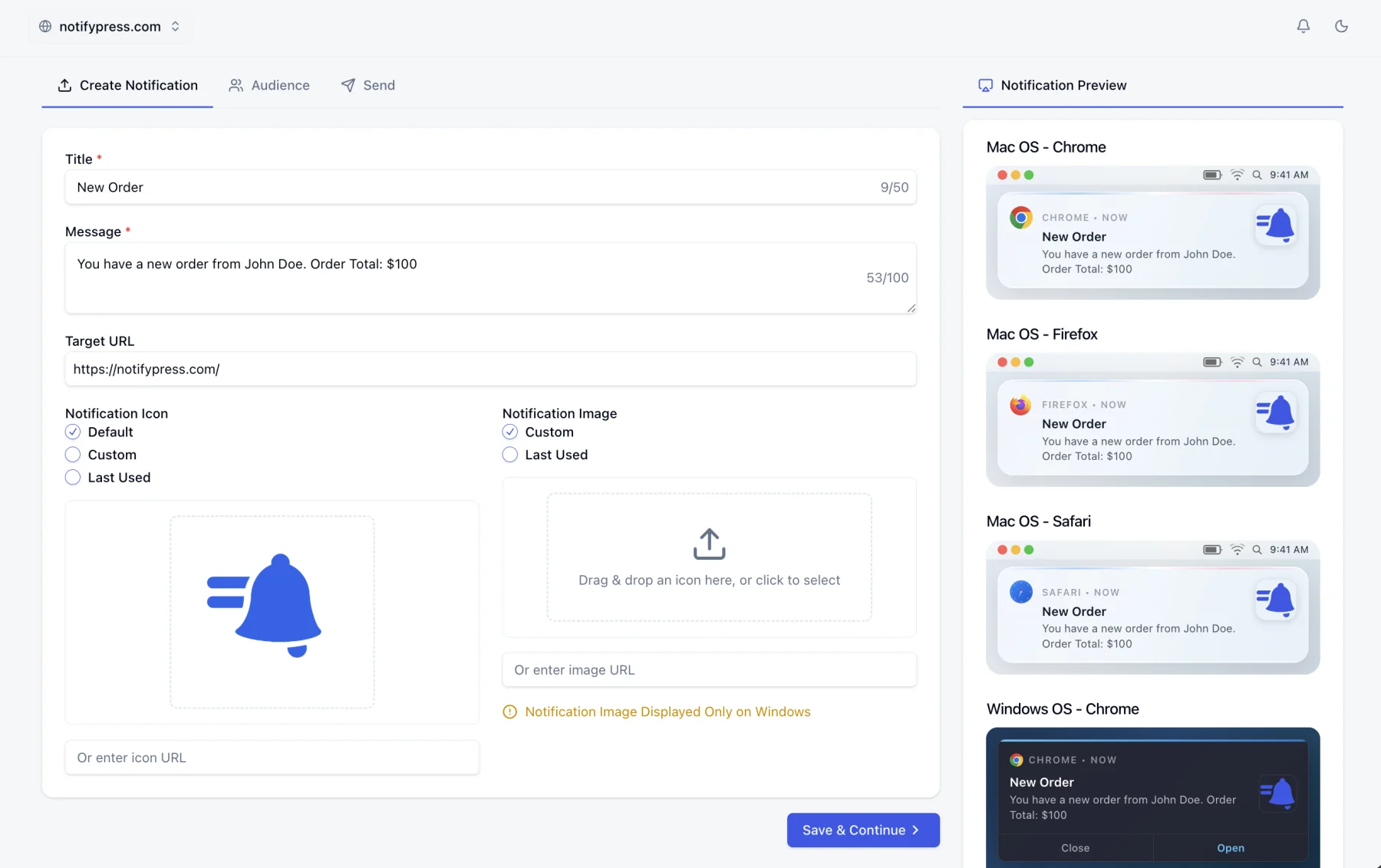
How a campaign works
Three tabs, in order. You can stop after the first one and come back to a draft later.
Create Notification
A title, a message, and a target URL. The title and message have live character counters (50 and 100) because that is roughly what a browser will show before it truncates. Add an icon and an image, or reuse the ones from your last campaign.
Audience
Send to every active subscriber on the site, or pick one segment. Segments are built from country, device, browser and tags you apply yourself, so "mobile subscribers in Germany tagged as trial users" is a saved audience rather than an export.
Send
Send now, schedule it for later, or set it to repeat. Delivery is spread across our infrastructure, so a campaign to five million subscribers does not hold up a campaign to five hundred.
What goes into a campaign
Write it, target it, send it
Give a campaign a title, a message, and a destination URL, choose everyone or a segment, and send. Drafts stay editable until the moment they go out.
Icons and images
Attach an icon by uploading one or pointing at a URL you already host, so a notification looks like it came from you. A larger hero image can be attached too. Windows renders it, other platforms quietly drop it.
See it before they do
A live preview sits beside the composer and redraws as you type, showing the message as Chrome, Firefox and Safari on macOS and Chrome on Windows will actually render it. Chrome, truncation and all.
Tracked from the first send
Views and clicks are recorded per campaign automatically, with no tagging scheme to set up and no extra script to install.
Send from wherever you work
Three front doors, one delivery pipeline. A campaign sent from WordPress lands in the same list, with the same tracking, as one sent from the dashboard.
From the dashboard
The three-step composer above, with the live preview and your saved segments.
See segmentationFrom WordPress
The plugin puts the same campaign form inside wp-admin, and can fire a test send to your own browser before you commit to the real one.
See the WordPress pluginFrom the REST API
POST a campaign from your own backend. Pass a subscription token and it goes to exactly one browser. The way to test a campaign on yourself from code.
Read the API overviewNot sending it right now?
Pick a time and let it go out on its own, or set it to repeat on a schedule. Either way it stays cancellable, and cancelling returns it to a draft rather than throwing it away.
Questions, answered.
Send your first campaign today.
Free forever for up to 300 subscribers, with 500 campaigns a month.